Showing posts with label Installation. Show all posts

Mar 19, 2014

Discard AppWebs When Setting Custom MasterPages

I have long used a feature event receiver to set MasterPages throughout the webs (i.e. sites) in a site collection when my branding feature is activated, and also an inheritance event receiver to set the MasterPage for any new web when it has been provisioned. In SharePoint 2010, search sites required a different MasterPage than the rest of the sites, so in the code of the receivers, this was always taken into consideration, as you can see in the article linked above. In 2013, this is unnecessary as the same MasterPage goes for all sites, so I have used the simplified version of the receiver code, with no webtemplateid checks.

Or, so I thought. Turned out, my testing had been lacking, since I do not use apps in my development&test environment, and thus it had not occured to me, that the app webs (which I sort of assumed to be separate, but apparently are not) respond to these event receivers too. As tests proved, my receivers actually "broke the SharePoint" when appwebs were involved. So, a little improvement to both receivers here, checking that a web is not an appweb (APP#0, WebTemplateId == 17) before making any MasterPage changes:

Feature event receiver, activate feature:

SPSite site = properties.Feature.Parent as SPSite;
            if (site != null)
            {
                SPWeb topLevelSite = site.RootWeb;
                string WebAppRelativePath = topLevelSite.ServerRelativeUrl;

                if (!WebAppRelativePath.EndsWith("/"))
                {
                    WebAppRelativePath += "/";
                }

                foreach (SPWeb web in site.AllWebs)
                {
                    if (web.WebTemplateId != 17)
                    {
                        web.MasterUrl = WebAppRelativePath + "_catalogs/masterpage/mycustommaster.2013.masterpage.master";
                        web.CustomMasterUrl = WebAppRelativePath + "_catalogs/masterpage/mycustommaster.2013.masterpage.master";
                        web.Update();
                    }

                }
            }

Event receiver, web provisioned:

SPWeb newWeb = properties.Web;
            SPWeb topSite = newWeb.Site.RootWeb;
            if (newWeb.WebTemplateId != 17)
            {
                newWeb.MasterUrl = topSite.MasterUrl;
                newWeb.CustomMasterUrl = topSite.CustomMasterUrl;
                newWeb.Update();
            }
        }

For the sake of consistency, I also fixed the deactivate feature code to leave the appwebs alone.

Sep 5, 2012

Initial Experiences with SharePoint 2013 Preview

A bit ashamed, I admit I'm a late bloomer. The SharePoint 2013 Preview was published while I was bathing under the Greek sun, completely oblivious of what was going on in the technical world. And once I was back, I was hit by a  load of other stuff and... oh, I know, lame excuses. I did get a couple glimpses of the new SharePoint already, and I have read several articles about it, so I'm not completely clueless. But only today did I get around to setting up my first SharePoint 2013 Preview server. If I may say, not a bad timing though, for I now got to use the WinServer 2012 RTM for the installation.

As for now, I'm using VMWare 8.0.4 as my virtualization platform, as for now also running on top of Win7 (upgrading to Win8 in progress, currently in planning stage). My poor laptop only has 8GB of memory so my virtual machines are limited to far less RAM than e.g. SP2013 would actually like to have, thus one of my first experiences with my brand new SP2013 farm was this polite notification:
as I was running (eh, crawling ;) ) the server through the farm setup wizard. Somehow much more humane and sympathetic than the donut or the "SharePoint sun" of the previous versions. My initial reaction to this was "Aww, don't worry, I'm sorry to provide you with so little RAM!" which changed into a more impatient "oh c'moon! can't be that hard!" after a good five minutes of waiting. Albeit, I was putting my server through VisualStudio2012 installation at the same time.

The installation of WinSrv2012 was a smooth experience, much like installing Win8 (yes, I do have that too on a virtual machine, though not on my host). But my first attempt at getting the VM up and running failed miserably when I tried to install the VMWare Tools. They installed. To an extent. But then the Windows went black. And stayed black. No rollback, no nothing. New VM it was. And no VMWare Tools this time.

After that, a just as smooth (but lengthier) installation of SQL2012. Nice :) On to SharePoint Prerequisites. Now that was a bit of a nuisance. Not in itself, but installing from a network drive, it thoroughly messed up the restarts and was not able to continue after them, so it was a bit of manual manouvering. But succeeded eventually.

So, on to SharePoint 2013 Preview, finally. The installation experience was just like 2010. 

After the installation, one of the very first interesting little things I ran into, was the selection of the experience version when creating a site collection:


I had read about it already, I knew it was there somewhere implemented in some way, but didn't know where. I had somehow assumed it to be something more like the visual upgrade of 2007->2010, hidden in settings etc. But it was right there, in the site collection creation form. 

The next thing I got, though, was not what I expected to get. It was a bit disheartening really:
Though a polite error message is definately nicer than a blunt one, it doesn't matter how sweet and sympathetic the error message is, it's still an error message. And, Schema? What do you mean XML Schema is wrong?! Not my doing! So, what now?

Not really having a clue as to why this error occured or what should be done about it (and not about to dig into it right there and then), I re-ran the Configuration Wizard, not changing anything, and then the Farm Setup Wizard as well. That did do the trick, but left me wondering a bit. And another thing: I kept getting errors whenever I tried to create a site collection in the default WebApp (port 80), so finally I created a new WebApp and had a site collection up in no time.

After a bit of a rough start, I finally had my farm and first site collection all set up, time to explore the SharePoint a bit. Central Administration, with my initial scan, seemed to be pretty much as it used to be, see for yourself:


But the actual site, what the user is presented with? That's a whole lot different from the old!

I quite like the new sleek look of the Team site, with the Win8-style tiles and all.


The option to do things like drag documents to the library right there on the page, or edit navigation links straight from the page add a nice touch.


In addition to this, the biggest changes for the average user and content manager are, in my opinion, the SkyDrive etc. instead of My Site, and all the new sharing links etc. and the SharePoint Apps. 
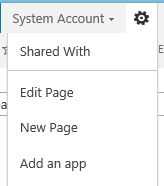


The default SharePoint Apps are essentially the same as creating new lists and libraries to the site. You don't create anything anymore (did I look for that for a while the very first time I was fiddling with the SP2013!), you add apps, as is sort of appropriate in these app days we are living in nowadays.


Where it really gets interesting though is the SharePoint App store I have so far only read about. But here it is, ta-daa:


With an old SharePoint logo, at least for now, hmm.

Still, the biggest interest for me is definately what's under the layer of paint. The HTML base, the MasterPages, the JavaScript, UI development in general. And definately the Design Manager! And new SharePoint Designer, too. Those I did not get to explore thoroughly quite yet myself - so far I have only been reading about them. But as soon as I have proper first hand experience, I will be blogging about them too, all in good time.

*Working on it... Sorry to keep you waiting.* 

Jan 5, 2010

SharePoint, WinSrv2008(R2) and Desktop Experience

A quick note, adding one small but rather important detail to the configurations of Windows Server 2008 (R2) with SharePoint (2010) on it. For testing, develpoment and demo purposes I run a single virtual machine, using using thus the server as client as well as the base server for SharePoint. For full functionality of eg. document libraries the server needs to run the Desktop Experience feature. This enables for example saving documents to doc libraries straight from Office applications and other Explorer related services.

Dec 16, 2009

Uninstalling VisualStudio2010 beta1

Uninstalling VisualStudio 2010 beta1 is, of course, a necessary operation prior to installing Visual Studio 2010 beta2. If you have been running VS2010b1 on Win7 or WinSrv08(R2), uninstalling isn't a simple 3-click-operation. Well, it is, essentially, but while unistalling the TFS Object model, the uninstaller asks for this file TFSObjectModel-amdXX_ENU.exe which is nowhere to be found, really. The workaround is to either unsinstall this component manually, but this file can also be found and downloaded from the go.microsoft-site:

x86: http://go.microsoft.com/fwlink/?LinkId=148199&clcid=0x409
x64: http://go.microsoft.com/fwlink/?LinkId=148200&clcid=0x409

Dec 10, 2009

Getting on with SharePoint 2010 beta2

I've been fiddling with Office and SharePoint 2010 since summer, since the Technical Preview. Now I finally got the chance to re-install it all - actually, decided to build up a whole new virtual machine instead of un-installing and re-installing. I'm running this machine on VMware Station, hosted on Win7 and I like it. More than the Hyper-V hosted on Server 2008R2.

This virtual machine of mine runs WinServer 2008R2 and on top of it I installed SharePoint 2010 beta2, prerequisites first (they come in the same download), SP installation next and the configuration wizard then. And all went well until step 8/10 of the wizard. Then it informed me that it couldn't create sample data plus a couple other errors and end of wizard. No, I hadn't had the mind to google installation instructions, shame on me. I stated this failure out loud and got the tip: I was missing a hotfix.

So, to avoid making the same time-consuming mistake I made. be sure to download and install the appropriate .NET 3,5 sp1 (WCF) hotfix for WinServer2008R2 and Win7 on your server before installing SharePoint 2010! It did seem to work the wrong way round too, for after the configuration wizard failed, I downloaded the hotfix, installed it, rebooted the server and ran the configuration wizard again, now with a successful outcome.

After this I made two essential configurations on my server: first I turned off the IE ESC in server manager (to make IE browsing less restricted and thus easier), secondly I turned off Kernel mode in Windows authentication in IIS management.

As for my testing and demo environment I didn't really do much other configurations. A standalone server with 2GB ram seems ok for my purposes. For more information on SharePoin2010 beta isntallation in a bigger environment, see Jie Li's Installation note for SharePoint2010 Public Beta.